
My complete AI research workflow in 2026
How I use Claude, Claude Cowork, chatGPT and Gemini to research 20x faster

Last week I looked at four companies in one afternoon.
Sector context, business model, moat, financials, risks.
Each one took under 45 minutes from a blank page to a structured investment note.
A year ago, one company would have taken me most of a day.
Nothing changed about the quality of the work.
What changed was the workflow.
I stopped using one tool and building a stack of the right four.
I’ve written a lot about individual prompts on AI Investing Lab.
The sector analysis prompts. The moat framework. The earnings briefing template. But I’ve never shown you how all the pieces connect in a real research session.
That’s what this article is. Not just what tools I use.
Exactly how I use them, in what order, for what purpose and why each one earns its place.
If you’ve been using just one AI tool for your research, you’re probably doing the right tasks in the wrong place. This is how to fix that.
The stack
I use five tools: Claude, Claude Cowork, ChatGPT, Gemini and Gemini Deep Research. Each one has a specific job. None of them does everything well.
The key insight is that these tools are not interchangeable.
They have different strengths at different stages of the research process.
Using the right one for the right task is what makes the stack fast.
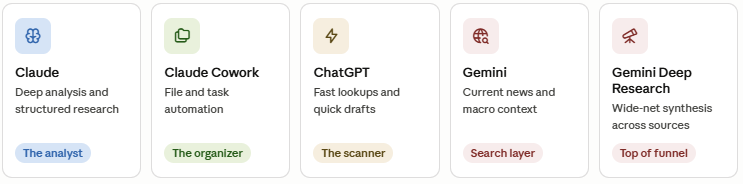
Claude: the analyst
Claude is where the serious work happens. When I need to break down a business model, run a competitive moat analysis, or convert an earnings transcript into a structured briefing, this is the tool I reach for.
The reasoning is long-form and coherent. It holds complex prompts without losing the thread. The output reads like something a junior analyst would draft after spending a full day on the research.
I covered the main prompts I use in my earlier posts on the top five Claude investing prompts and the three prompts I use to find undervalued companies. Those frameworks haven’t changed. What has changed is how Claude fits into a wider workflow rather than being used in isolation.
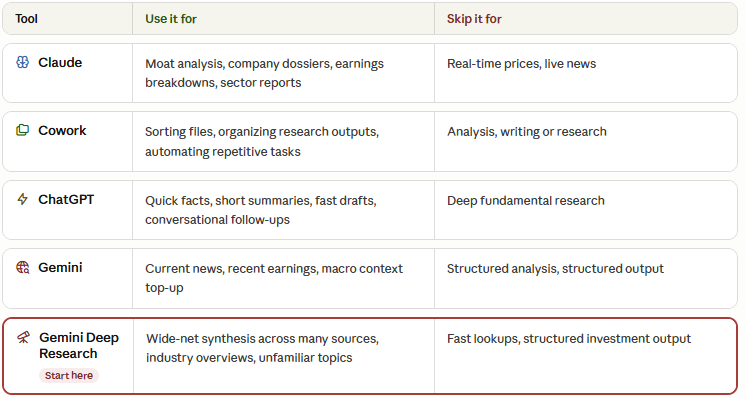
Claude is best for: moat analysis, company dossiers, earnings breakdowns and sector intelligence reports. If you want to understand a business at depth, this is your tool.
Claude Cowork: the organizer
Claude Cowork is the newest addition to the stack and most investors haven’t touched it yet. It’s a desktop tool from Anthropic that lets you automate file and task management without writing any code.
For research workflows, this matters more than it sounds. When you’re analyzing multiple companies across a week, outputs pile up. Notes from different sessions, exported reports, transcript summaries, financial model drafts. Finding things later becomes a project in itself.
Cowork handles the plumbing. I use it to sort outputs into the right folders, rename files automatically and keep everything organized without thinking about it. It doesn’t do the analysis. It makes sure the analysis doesn’t disappear into a messy file system.
ChatGPT: the scanner
ChatGPT earns its place through speed. It’s where I go for fast lookups, quick definitions, short summaries and sanity checks that don’t need structured reasoning.
When I tested Claude against Perplexity on the same earnings research task earlier this year, Claude produced clearer and more structured output. ChatGPT has a similar profile to Perplexity in this respect. Fast and conversational, but not where you want to do deep fundamental work.
For anything that needs precision and structure, Claude wins. For anything that needs a quick answer, ChatGPT is faster to interact with. Use it accordingly.
Gemini: the search layer
Gemini handles current information. Recent earnings, analyst commentary, macro news that came out in the last few days. Things that may not be in any AI model’s training data yet.
I use it specifically for the top-of-funnel information that provides context before I go into deeper analysis with Claude. Think of it as the layer that connects my research to what’s actually happening right now.
Gemini Deep Research: top of funnel
Deep Research is the feature that genuinely changed how I start a research session. It runs a multi-step research process across a wide range of sources and synthesizes the results into a structured overview.
When I’m looking at a company or sector I don’t know well, starting with Deep Research gives me a broad orientation in minutes rather than hours of manual reading. It casts a wider net than any single search or prompt.
The output isn’t as precise or investment-grade as what Claude produces. But it’s not supposed to be. Its job is to build context before the deep work begins. Think of it as your pre-brief before the analyst session.
How the workflow fits together
Here’s how a real research session looks. The order matters, which we will go in depth later.
The whole process that used to take a full day now takes two to three hours, sometimes less, depending on how familiar I am with the sector.
Step-by-step: exactly how I research a company
Below is the complete process I run for every company I analyze. Not the concept.
The exact steps, in order, with the specific tasks I do at each stage.
